This week will be a busy week in Math Foundations 20.
On Wednesday, Oct. 5 we will write a Practice Exam for Chapter 2.
On Thursday we will be in the Writing Lab. We will work on our Logo Design Assignment (Chapter Task 2) and also select a topic for our Course Project. The Logo Design task is due on Tuesday after the long weekend, October 11.
On Friday, October 7 we will be writing the Chapter 2 Exam.
Have a great week. If you need any extra help, come and see me!
Monday, October 3, 2011

Tuesday, September 13, 2011
Science 10 Unit Quiz
There will be a quiz in Science 10 to complete this first unit on the Nature of Science. The Quiz will be in class on Friday, Sept. 16.
The topics are:
Why study science?
What is science?
What is technology?
Applying the Scientific Method: Using the specific steps of the scientific method, explain steps I could follow to fix a specific problem. For example, how could you follow these steps if your computer did not turn on?
i. Ask a Question
ii. Form a Hypothesis
iii. Design an experiment – explain independent, dependent, and controlled variables
iv. Perform the experiment and analyze the results
v. Share the results
Junk Science
Formalized hypotheses
Variables
Physics 20 Intro Exam
HERE are the answers to the Physics 20 intro review. The exam is on Friday, Sept. 16. Next week we will move into studying Waves!
A reminder of the Why the Fizz? Assignment. It is due Thursday, Sept. 29. Please, ask any questions you may have about it. Have fun with it!

A reminder of the Why the Fizz? Assignment. It is due Thursday, Sept. 29. Please, ask any questions you may have about it. Have fun with it!
How to Write a Blog Post
To write a blog post:
1. Go to your class blog or blogger.com.
2. Click Sign In at the top right corner of the page.
3. Put in your Gmail account and password.
4. Once you have signed in you should see a list of all the blogs you can contribute to. If you are in one class with me you will see that one blog, and if you are in two classes you will see both of the blog titles.
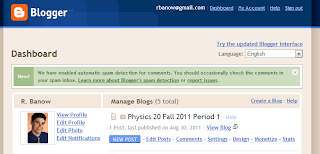
5. Click on the New Post button. This will load up the page where you will write your post.
6. Fill in the form, including Title and your actual post. Notice along the top you have the options to Boldface, italicize, put in a link, spellcheck, add a picture, or add a video to your post. Fell free to experiment with these.
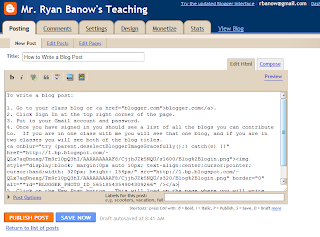
7. Once you have completed your post, click Publish Post.
1. Go to your class blog or blogger.com.
2. Click Sign In at the top right corner of the page.
3. Put in your Gmail account and password.
4. Once you have signed in you should see a list of all the blogs you can contribute to. If you are in one class with me you will see that one blog, and if you are in two classes you will see both of the blog titles.

5. Click on the New Post button. This will load up the page where you will write your post.
6. Fill in the form, including Title and your actual post. Notice along the top you have the options to Boldface, italicize, put in a link, spellcheck, add a picture, or add a video to your post. Fell free to experiment with these.

7. Once you have completed your post, click Publish Post.
Tuesday, August 30, 2011
Welcome to 2011-12!
Welcome back to the Fall 2011 Semester at HCI! Thank you very much for stopping by the blog. Check back here for regular class updates and announcements. You may also sign up to receive an email each time an update is added to this Blog. You can find that on the Right of the page.
Along the top of this page you will find links to each classes' specific blog.
Along the top of this page you will find links to each classes' specific blog.
Wednesday, August 24, 2011
Writing Equations on Our Blogs!
THIS DOES NOT WORK ANYMORE!!
I installed a script that will allow us to write equations on our class blogs.
In order for text to show up as an equation, simply put a $ on each end up what you write. For example, if you want
1/2 x^2 + 3x - 7 = 0 to show up as an equation put a $ before the 1/2 and another after the 0.
Ex. $1/2 x^2 + 3x - 7 = 0$
The equations will not display properly when you preview your post, but if you Publish the post it will show up. If you publish, but made an error, you can click the Pencil icon to edit your post.
This explanation is very basic. If you want to get very fancy with your equations, you can read about it here. The programming language we are using to enter equations is called LaTeX. You may explore this more in depth if you care to, but it is not necessary.
Wednesday, July 27, 2011
Subscribe to:
Posts (Atom)